Concert Archives
- 4.8
- Rating
- 50.00K
- Installs
- Free
- Price

 Analysis by App-foxy
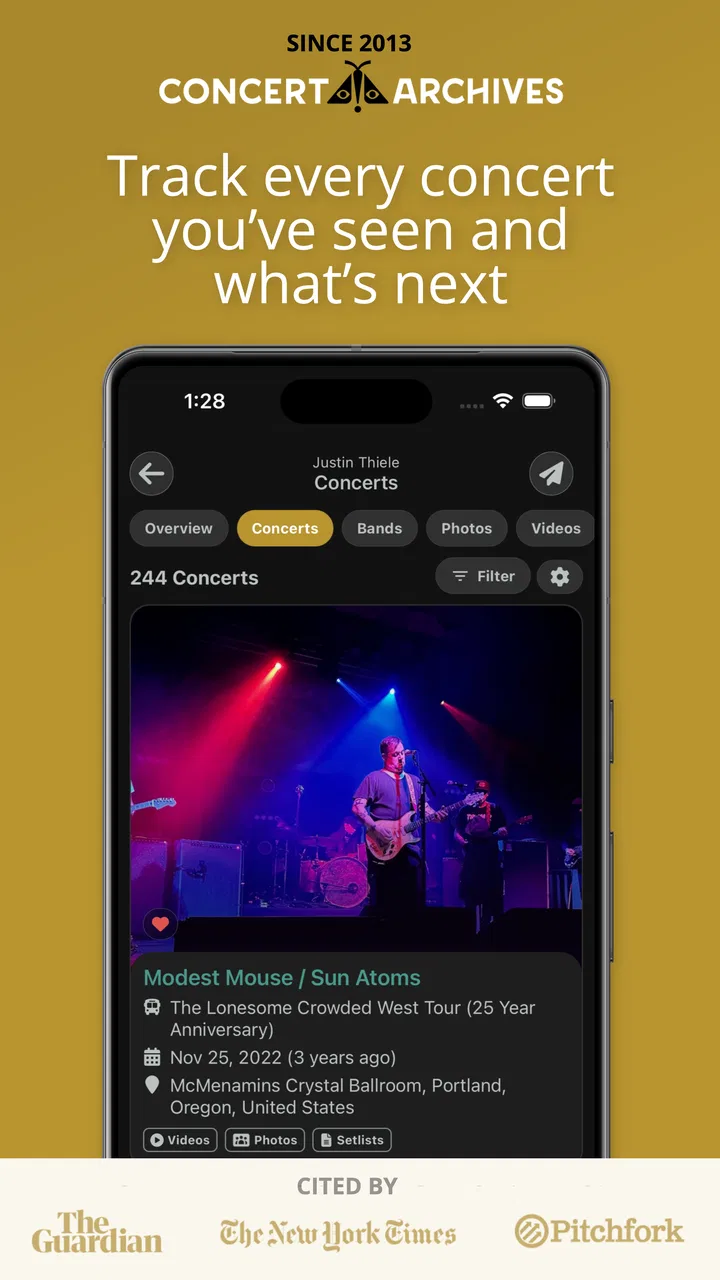
I installed Concert Archives expecting a simple way to remember shows, but I found something more useful: a focused home for people who treat live music as part of their personal history. It combines the feel of a concert diary with a social space and a searchable music database, so it is less about discovering a random playlist and more about keeping track of the nights, artists, venues, and memories that matter to you.
That focus immediately separates it from general music apps. Spotify, Apple Music, and similar services are built around listening; social networks are built around conversation; a notes app can store memories but gives them no musical structure. Concert Archives sits between those uses. I would recommend it most strongly to someone who regularly attends concerts, follows particular artists on tour, or wants a dependable record of a live-music life rather than another way to stream songs.
What I considered before recommending it
My first decision criterion was simple: does the app make concert history easier to maintain than a notebook, photo folder, or scattered social posts? In my experience, the answer is yes when the event itself is the center of attention. I could think about a show as a complete experience instead of trying to reconstruct it later from camera-roll images, ticket emails, and half-remembered posts.
You May Also Like

 Blood Strike: 2.5 Anniversary
Blood Strike’s Loadouts Turn Every Drop Into a Tactical Gamble
A close look at Blood Strike’s custom loadouts: how fast access to signature weapons reshapes its battle royale rhythm, rewards preparation, and narrows the gap between fights.

 Pandora - Music & Podcasts
Pandora’s Music Is Easy to Start, but Harder to Recover
Pandora’s strength is its low-effort path from a seed to a station. Its weak spot is how much confidence it asks you to place in connection, setup, and quiet recovery.

 8 Ball Pool
 Is Built on Rivalries, Rematches, and Routine
A close look at the rivalries, rematches, shared routines, and unanswered safety questions that turn a quick pool match into a persistent mobile community.

 Samsung Music
’s Quiet Strength Is Playing What You Already Own
Its reach comes less from spectacle than from dependable access to a personal library. That simplicity is both the app’s strongest retention engine and its ceiling.

 AccuWeather: Weather Radar
AccuWeather Review: A Quick, Clear Forecast for Everyday Decisions
For everyday plans, the best forecast is the one you can understand quickly. AccuWeather makes rain timing, radar, and local conditions easy to act on, with a few trade-offs.

 Hill Climb Racing
Why Hill Climb Racing Still Turns Crashes Into One More Run
A tiny car, a bumpy hill and one more upgrade: Hill Climb Racing keeps resurfacing because its simple chaos makes every near-miss feel personal.
More From Our News Desk



The second criterion was whether the social side adds value without taking over. Concert Archives is not trying to be a broad social network for every interest. Its usefulness depends on finding people who care about shows, setlists, venues, and artists. That narrower audience is a strength for the right user, because the conversation has a clear subject, but it also means the app will feel quieter if your friends do not use it or if you rarely attend live events.
I also looked at practical access. The app is free, is intended for a Teen audience, and works on Android devices running version 7.0 or later. The current version is 8.8.0, and the Android listing shows over 10 thousand installs. Those details make it approachable for someone who wants to try it without committing money first, although a free download alone does not make it worthwhile for someone with no interest in concert history.
Finally, I considered whether it could replace several small habits. Many concertgoers save screenshots of tickets, write an artist name in a notes file, post a photo, and then forget the date or venue. The app has a clearer purpose: bring those memories into one music-specific record. The real benefit is not another feed; it is turning scattered concert memories into an organized personal archive.
How the diary works in everyday use
My most realistic use case was the day after a show. While the details were still fresh, I could record the event, identify the artist, and add my own impression instead of waiting until the memory became vague. That small delay matters. A week later, I might remember that the performance was excellent but forget which venue hosted it or who I attended with. A concert diary encourages me to capture those details while they are still connected.
I found it helpful to treat each entry as a prompt for memory rather than a formal review. A short note about the opening act, the best song of the night, or an unexpected moment is often more valuable than a long paragraph. If I later browse my history, those personal details give the record a feeling that a calendar entry cannot provide.
There is also a useful distinction between recording a concert and posting about it publicly. A social post is usually designed for immediate reactions, while a diary entry can remain meaningful years later. I would use the app for the durable record and keep a separate social platform for friends who are not interested in concert databases. That division keeps the archive useful instead of burying it under unrelated updates.
Why the database angle is more valuable than it sounds
The database element gives the app a structure that ordinary notes lack. I could approach my concert history through artists, events, and the broader live-music context rather than reading one long chronological list. That makes it easier to answer personal questions such as which performers I have seen most often, which venues appear repeatedly, or which period of my life was especially active for shows.
This is where I see an advanced use that a casual user might miss: use the app before and after a concert, not only after it. Before attending, I can browse an artist or event to refresh my memory and set expectations. Afterward, I can add the experience while it is fresh. Over time, the same workflow turns the app into a planning reference as well as a diary.
I would still avoid treating the database as an unquestionable authority for every personal detail. A database can organize event information, but my own memory is what gives the entry meaning. If a show had a special significance, I would write that context myself rather than relying on a basic event record to explain why it mattered.
Where Concert Archives wins against familiar alternatives
Compared with a notes app, Concert Archives wins through context. A note can preserve a date and a sentence, but it does not naturally connect that memory to an artist-centered music history. Notes are flexible, yet that flexibility becomes a weakness when I want to search or review several years of concerts in a consistent way.
Compared with a calendar, it wins emotionally. A calendar tells me that I attended an event; it does not encourage me to remember what the night felt like. Calendars are excellent for future scheduling, but they are not designed as a personal archive of live music. I would use a calendar to avoid missing a show and this app to remember it afterward.
Compared with Instagram, Facebook, or another general social network, the advantage is relevance. A concert-related entry is not competing with family updates, news, advertisements, and unrelated recommendations. The trade-off is reach. A general platform is better when my main goal is showing photos to everyone I know, while this app is better when I want the music context to remain central.
Compared with a streaming service, the difference is even clearer. Streaming apps help me hear an artist at home; this one helps me preserve the fact that I saw that artist live. If my priority is playlists, audio quality, or immediate listening, I would choose the streaming service. If my priority is the history of the performances I attended, Concert Archives is the more appropriate tool.
The app is also more specialized than a ticket wallet. A ticket wallet is useful for entry and quick access to purchase details, but it is not necessarily where I would write a personal account or explore a performer’s broader live history. I see Concert Archives as complementary rather than a replacement for tickets, calendars, or photo storage.
Social features: a benefit with a built-in limitation
The social network side makes the archive feel less solitary. I like the idea of seeing concert experiences as part of a community instead of keeping every entry private and disconnected. For someone who enjoys comparing memories, following fellow fans, or discussing performances, that shared layer can make the diary habit easier to maintain.
Still, I would not install it solely for instant social activity. A niche service naturally depends on the people who are active around the artists and events I care about. If my friends are all on another platform, I may need to maintain the app for my own archive rather than expecting it to replace every conversation. That is not a flaw in the concept, but it is an important expectation to set before switching.
My practical advice is to begin with the personal record and let the social element grow naturally. Add a few meaningful concert memories first, then explore whether the community adds anything to the way you enjoy music. This approach avoids judging the app too quickly by the size of its feed.
Small workflows that make it more useful
One useful workflow is a post-concert capture routine. As I leave the venue, I would note the artist, location, date, companions, and one detail I do not want to forget. Later, I can add photos or refine the memory when I have more time. The important part is creating a quick first record before the event blends into the rest of the month.
A second workflow is using the archive to prepare for a repeat artist. Before seeing a familiar performer again, I can look back at previous entries and remember how different shows felt. That gives me a better basis for comparison than relying on a vague impression. It also helps me notice whether I am attending the same venue repeatedly or discovering new places.
A third is keeping personal notes specific rather than generic. “Great show” will not help much later. A detail about the crowd, the sound, an unexpected song, or the person I went with can bring the entire evening back. This is a small writing habit, but it is where the app becomes a diary instead of a database filled with bare labels.
There is a trade-off in this level of organization: it asks me to be consistent. If I only add entries occasionally, the archive will have gaps and become less reliable as a personal history. People who dislike logging activities may find that effort unnecessary. The app rewards regular use, not passive installation.
Who should choose it, and who should skip it
I think it is a strong fit for frequent concertgoers, collectors of live-music memories, fans who follow tours, and anyone who enjoys looking back at the places and artists connected to different stages of life. It is also a good choice for someone whose existing system is a mess of screenshots, notes, and social posts and who wants one music-specific home for that information.
I would be more cautious recommending it to someone who attends a show only once in a while and does not care about keeping a record. For that person, a calendar reminder and a photo folder may be enough. I would also point streaming-focused listeners toward their existing music service, since this app is not meant to solve the problem of finding something to play during a commute.
It may not be the best first choice for a person whose main goal is ticket purchasing, venue navigation, or broad event discovery. Those needs belong more naturally to ticketing, maps, or general event platforms. Concert Archives makes the most sense after the decision to care about the concert itself has already been made.
What switching really involves
Moving from scattered records is not technically difficult, but it can take time if I want a complete history. The cost is mostly attention: remembering older shows, deciding which details matter, and entering them in a consistent way. I would not try to rebuild every concert in one sitting. Starting with recent events and the shows I remember most clearly makes the transition feel manageable.
There is also a mental cost to changing from passive storage to active archiving. A photo folder asks almost nothing of me, while a dedicated concert diary invites reflection. I see that as a benefit when I want meaningful records, but it can feel like a chore during a busy week. A short entry is better than waiting for the perfect account and recording nothing.
The free price lowers the risk of testing that habit. The app has a 4.7 average from around 674 ratings and 97 reviews, which suggests a positive reception among the people who have chosen to rate it. I would treat that as encouraging rather than decisive: the important question is whether I attend enough concerts to benefit from its specialized approach.
My recommendation after using it
Concert Archives is a focused app with a clear reason to exist. I appreciate that it does not try to be a universal entertainment hub. Its strongest quality is the way it connects personal memories with artist and event context, giving concert fans a record that feels more meaningful than a list of dates.
I would recommend it to a friend who has ever said, “I wish I could remember every show I saw.” I would suggest starting with a handful of important concerts, adding a brief personal note to each, and then deciding whether the social and database layers fit naturally into the routine. That test reveals its value faster than browsing the feed without contributing anything.
My final judgment is positive, with one clear condition: choose it for preserving and exploring live-music experiences, not for replacing streaming, ticketing, or general social apps. Developed by Concert Archives LLC, it is free to try, accessible on older Android versions, and specialized enough to serve a real need. If concerts are part of your identity, I think it can become a satisfying long-term record. If they are only occasional events, the simpler alternatives may remain more convenient.
For me, the deciding advantage is that the app gives past concerts a place to stay. A show can disappear quickly from a busy schedule, but a well-kept entry can bring back the artist, the room, the people, and the feeling of that night. That is a modest purpose, yet it is exactly why Concert Archives earns a place on my phone.
FAQs for Concert Archives
01What is Concert Archives, and how does it work?
Concert Archives is a mobile app designed for music enthusiasts to track and document their concert history. Users can add past and upcoming shows, upload photos, and share their experiences with the community. Additionally, the app provides concert recommendations based on your music taste and location.
02Is Concert Archives available on both Android and iOS?
Yes, Concert Archives is available for download on both Android and iOS platforms. Users can find it in the Google Play Store for Android devices and the Apple App Store for iOS devices, ensuring a seamless experience across different operating systems.
03Can I import my concert history from other platforms?
Absolutely! Concert Archives allows users to import their concert history from other platforms such as Setlist.fm. This feature ensures that you don’t have to manually enter all your past concerts, making it easier to transition and start using the app more efficiently.
04Does Concert Archives offer social features?
Yes, Concert Archives includes various social features. Users can follow friends, discover concerts attended by others, and engage with a community of fellow music lovers. This social aspect enhances the concert-going experience by allowing users to share memories and find people with similar musical interests.
05Is there a premium version of Concert Archives, and what does it offer?
Concert Archives offers a premium version with additional features. Premium users can enjoy an ad-free experience, access more in-depth analytics about their concert history, and receive personalized concert recommendations. This version is ideal for avid concert-goers looking for enhanced functionality.
Pros
- User-friendly interface for easy navigation.
- Comprehensive database of past and upcoming shows.
- Option to add personal concert notes.
- Connect with other concert-goers easily.
- Regular updates keep data current.
Cons
- Limited offline access to archives.
- Some features require premium subscription.
- Occasional sync issues with new entries.
- Limited customization of personal profiles.
- No direct ticket purchasing through app.

Concert Archives
Gallery